



AI-Powered
AI agent features
Every reply uses full customer context from AI customer service software, so it feels personal, not automated. Sales closed and leads captured land in your Wins counter, in real time.
AI agent
Your AI agent tracks past chats, pulls from connected assets, and acts through your integrations.
Explore the AI agent
Website behavior tracking
Track visited pages and time on site for deeper chat context in real-time support.
Customer details
AI assistants can personalize every reply with names, emails, and purchase history.
Context-aware
Responses stay relevant with past tickets, customer behavior, and full chat history.
On-brand
Every reply sounds like you, consistent and personal, every time.
AI-Powered
Training your AI chatbot
Optimize your AI chatbot so it resolves more requests on its own, in any language your customers speak.
Skills
Describe what you want your AI agent to do in plain language. Preview a skill below, then create it for your website.
-
Turn conversations into qualified leads
When a customer shows buying intent, capture contact details and key requirements for sales follow-up.
-
Connect VIP customers with their account manager
When a VIP customer reaches out, then connect them with their account manager or dedicated VIP team.
-
Turn complaints into guaranteed follow-up
When a complaint needs human follow-up, create a priority ticket and set a clear response time.
-
Turn product questions into expert advice
When a customer needs product advice, capture requirements, then create a ticket for a specialist.
-
Save the sale with the right incentive
When a customer raises a price objection, share an approved incentive and tag the chat as a sales opportunity.
-
Grow every cart with the perfect add-on
When a customer mentions a product in their cart, recommend a relevant add-on, bundle, or warranty.


Custom instructions
Set your AI agent's role, tone, and boundaries, so it never strays off script.


Knowledge hub
Ground answers in your own content, so customers get accurate info without waiting on a human.


AI live chat automation
Manage real-time conversations from your website chat widget, mobile, messengers, and SMS. Assign, transfer, and resolve all chats in one place.


Handoff to human
Transfer conversations with full context and zero repetition. Pick up the thread right where it left off.
Lead generation
Ask the right questions at the right moment, so promising conversations turn into qualified leads.
Cross-sell & upsell
Deliver timely, relevant offers based on behavior and intent, right when a customer's ready to add more to their cart.
AI help desk tickets
Bring customer messages together, streamline teamwork, and maximize productivity from one place.


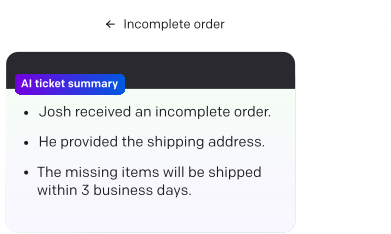
Ticket summary
Summarize ticket context in seconds using AI for faster handoffs and decisions.

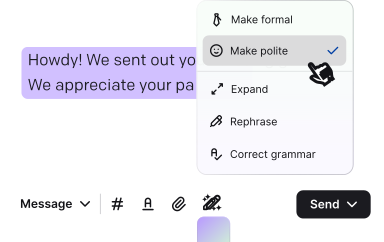
Refine replies
Get instant tone, grammar, and clarity suggestions right where you reply.

Ticket details
See all the key info, like ticket status, priority, and assignee, to help agents act quickly.
Ticket rules
Set rules to assign, prioritize, or tag tickets automatically to keep them organized.
Canned responses
Create once, save, and reuse in chats to reply faster to common requests.
AI-Powered
Customer list
A lightweight CRM built into Text, bringing together every customer detail from chats, tickets, and campaigns.


End data fragmentation
Support, sales, and marketing all work off the same up-to-date profile, instead of piecing one together from separate tools.
Stronger automation and AI
Richer customer data fuels smarter automation with Copilot and your AI agents.
Future-proof customer data
As cookies fade out, first-party data becomes the asset you actually own.
Leads from every interaction
Contacts become sales opportunities right inside your support system.
Proactive campaigns
Welcome new visitors, offer discounts, or ask for a review, all with pop-ups and banners you control.
Editable qualification fields
Add, edit, or delete the fields you use to qualify leads, so your criteria stay accurate as needs change.
Analytics
Track how AI and your team perform, right down to the chat and the ticket. Explore chatbot analytics.


AI performance
See resolution rate, CSAT, and transfers to human agents, all in one report.
Team performance
Track response times, satisfaction, and chat volume by teammate.
Chats & tickets
Spot missed chats, response times, and resolution trends before they become problems.
Export anything
Download raw data, schedule reports, or connect your own AI assistant via MCP.
Playbook
Automate the repetitive work, so your team spends time on customers, not busywork.
Start fast with templates
Choose from ready-made templates, like turning bad ratings into tickets, so you launch automations in minutes.

Build workflows your way
For full control, design workflows from scratch in our no-code editor, no developer required.

All your customer support tools in one place
Connect Slack, Mailchimp, and HubSpot through Playbook automations, bring in WhatsApp and Messenger as dedicated channels, and sync Shopify for order and cart context.

Download Text for desktop
Stay focused and help customers faster on your desktop, or check in from the Text mobile app when you're away.


Everything you just saw.
Free for 14 days.
Free 14-day trial No credit card required