Know what is in the cart
See current cart contents, quantities, currency, subtotal, total, and discounts during the customer conversation. Add-to-cart and remove-from-cart events give agents a clearer picture of the purchase in progress.



Give customers instant answers and give your team the cart context to help them buy. For a WooCommerce store, the AI Chatbot by Text connects AI chat, live support, cart activity, and completed-order events in one place.
Free 14-day trial No credit card required AI agent included
Over 35,000 brands are already selling through service with Text





Help customers find answers, give your team useful context, and connect service to completed orders.
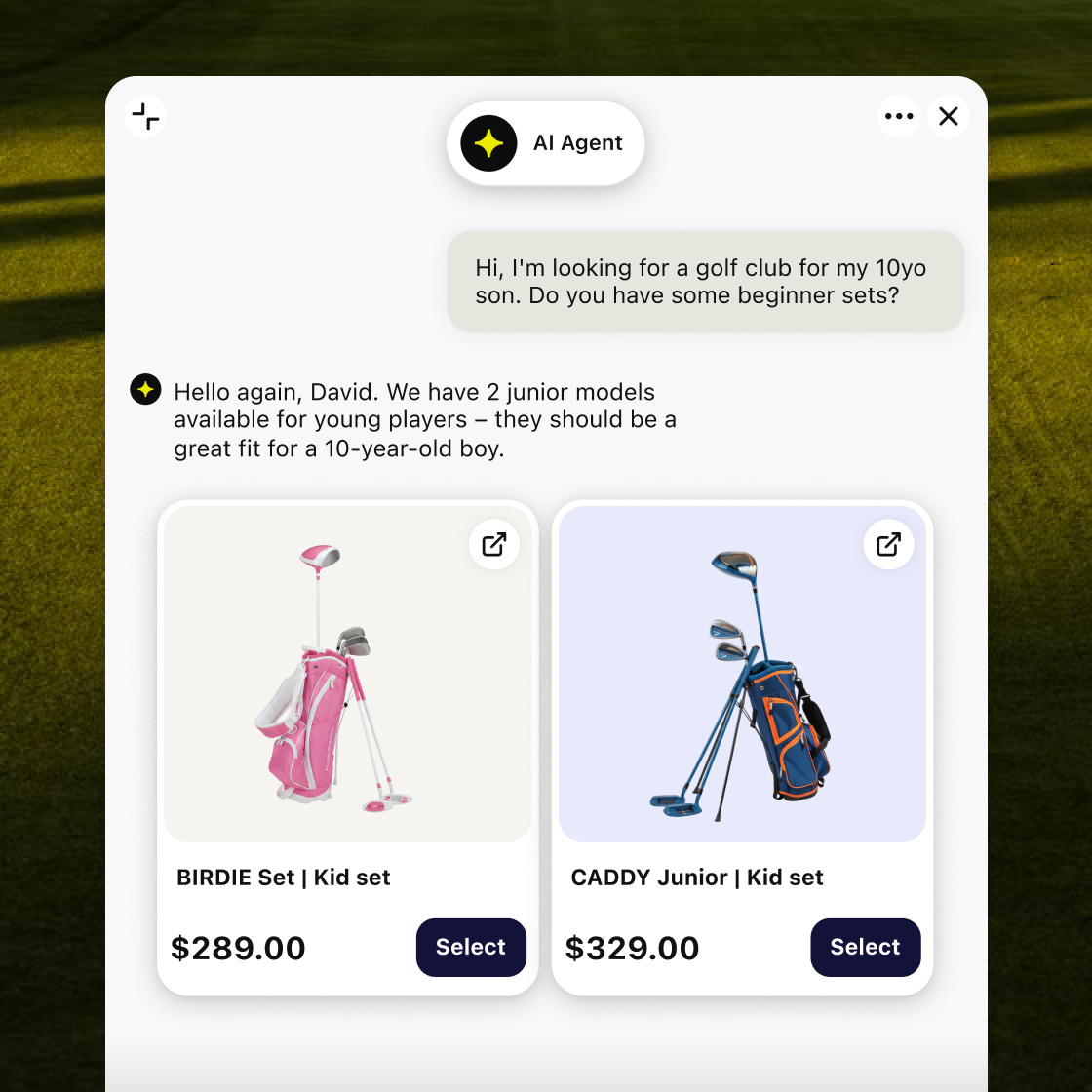
The AI agent handles routine product, payment, shipping, and return questions so customers get help from your approved store content.
Current cart activity and relevant product details help your team understand what the shopper is buying.
New completed-order events help you see which customer conversations contribute to revenue.
Generic chatbots start every conversation from zero. This AI chatbot for WooCommerce brings useful store context into the chat, helping your service team understand the current cart and event-linked product details before they respond.
See current cart contents, quantities, currency, subtotal, total, and discounts during the customer conversation. Add-to-cart and remove-from-cart events give agents a clearer picture of the purchase in progress.
Product titles, IDs, variants, SKU numbers, prices, quantities, thumbnails, and product links can accompany cart or order activity. Agents spend less time switching tabs and more time answering the question in front of them.
For logged-in WordPress users, the integration can pass the customer's display name and email into the conversation. That helps the service team respond on a more personal level.
When a shopper reaches a valid WooCommerce order confirmation page, Text can receive the new order number, totals, shipping and tax amounts, ordered items, and order status page URL for reporting.
The AI agent uses your approved website data and knowledge base to provide automated customer support, assist customers, and give instant answers while your team concentrates on cases that need judgment or action. Learn how the AI customer service agent uses your approved content.

Connect product descriptions, policy pages, help articles, PDFs, and custom content to the chatbot's knowledge base. The AI assistant gives customers answers from information you control and can be updated as products, delivery rules, or policies change.

Let the AI-powered chatbot respond to questions about sizing, product care, payment methods, shipping policies, returns, store hours, and other recurring customer queries. Instant responses help customers keep moving, while natural language processing helps the chatbot understand everyday requests.

The AI assistant can communicate in multiple languages, helping online stores serve more customers without creating a separate scripted flow for every market. Customers can ask questions naturally in the language they use.

Configured flows can collect contact details, qualify leads, and send useful customer information to your sales team with the conversation attached.
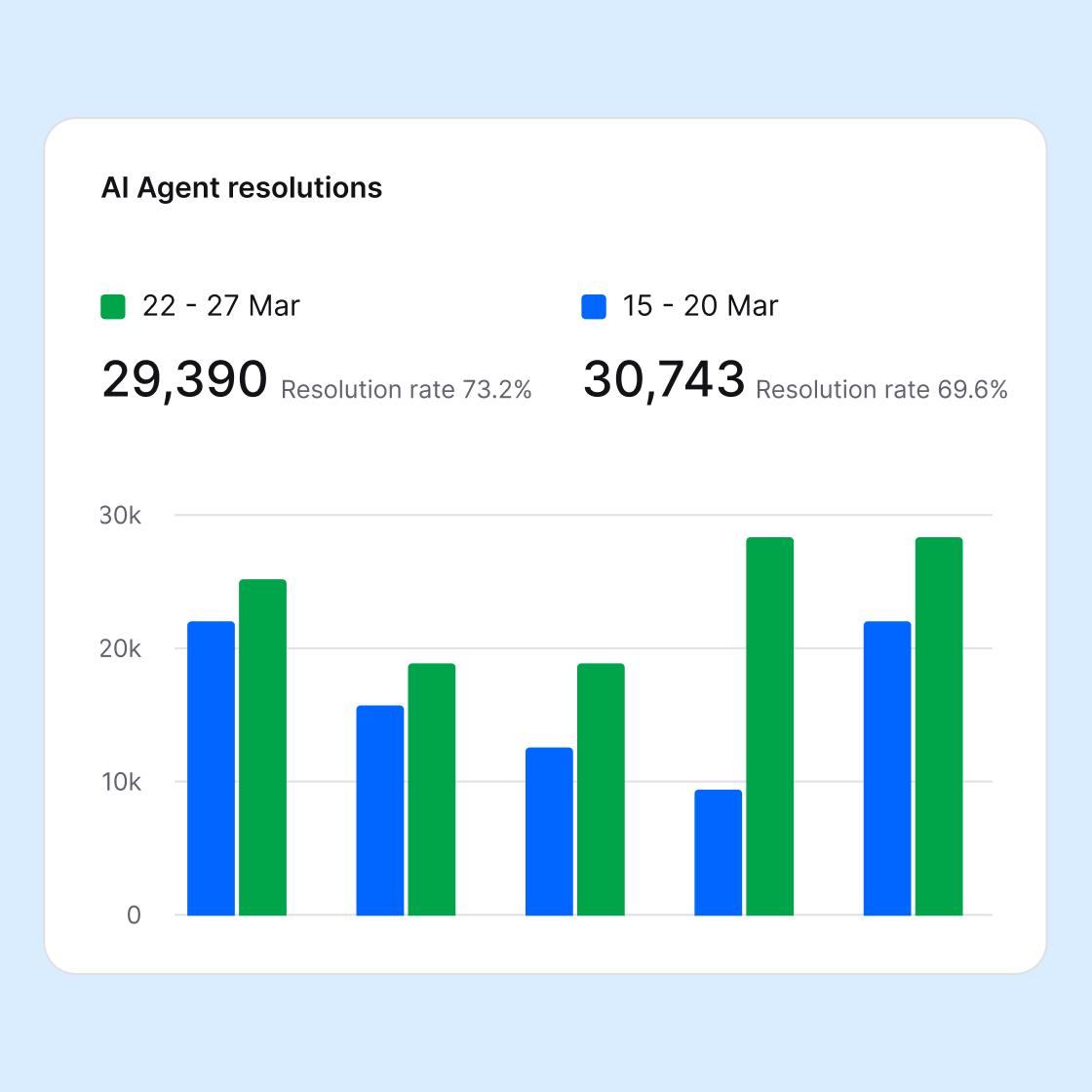
See live cart activity, completed orders, and revenue linked to customer conversations in one reporting view. Explore chatbot sales analytics.
Relevant add-to-cart and remove-from-cart activity appears as it happens, giving your team live conversation context while the customer is still shopping.
Completed-order events can connect a purchase with the surrounding customer conversation after the shopper reaches the order confirmation page.
Use ecommerce reporting to review orders and revenue linked to support conversations, then compare activity across your team and AI agent.
Good automation does more than reduce the support inbox. Busy stores can streamline support and answer more customers while people resolve the remaining customer conversations faster.
Instead of asking which item or order the customer means, agents can use product, cart, and available order details connected to the conversation. Logged-in identity, current cart activity, and the shopper's own messages create a smoother experience.


When a request moves from the AI agent to a person, the complete conversation stays available. The live support agent can see what the customer asks, which chatbot answers the AI model gave, and why customers need additional help.
Sign up freeThe chatbot for WooCommerce uses the maintained WordPress integration behind the Text website widget. No separate extension, custom code, or API key is required.
In WordPress Admin, go to Plugins, choose Add New, and search for AI Chatbot by Text. Install and activate the official integration.
Open the Text area in WordPress and select Connect to Text. Sign in or create an account, then finish the website widget setup.
When WooCommerce is active, the WordPress integration detects it automatically and enables the supported ecommerce events.
The official plugin requires WordPress 6.0 or later and PHP 7.4 or later. The plugin download is free, and every Text plan starts with a 14-day free trial.
View the WordPress pluginThe integration passes selected store data, including customer, product, cart, and order events, into Text for customer support and ecommerce reporting.
For a logged-in WordPress customer, the conversation can include the customer's display name and email.
Available cart data includes currency, subtotal, total, discounts, items, quantities, and add-or-remove events.
Products involved in cart or order events can include titles, IDs, variants, SKUs, prices, quantities, thumbnails, and links.
Available order context can include past purchases, order count, total spent, and newly completed orders with their numbers, totals, line items, and status details.
Setup can include site and admin URLs, administrator email, and WordPress, PHP, plugin, and WooCommerce versions for connection and troubleshooting.
Your team gets the store signals that help answer the shopper without working from a separate WooCommerce tab.
Customize the chat widget, AI agent instructions, and customer journey without changing your WooCommerce theme files.
Set colors, position, avatar, launcher style, greeting, custom message, and a background image so the chatbot window belongs on your storefront. Choose a background image that keeps the conversation easy to read.


Use custom instructions to define the chatbot's tone, what the AI assistant should prioritize, and when a customer interaction needs a person.
Review each chat log, refine instructions, and update the knowledge base when repeated shopper questions reveal an information gap for customers.

Compared with many AI chatbot plugins, setup is simple: install the free WordPress integration and connect a Text account. A 14-day free trial is available without a credit card, followed by the plan that matches your team, traffic, and AI usage. Compare current plans and pricing.
Start your free trialThere is no separate charge to download the plugin. Chat, AI features, reports, and the team workspace run through your Text account.
The trial includes the chat widget, AI agent, knowledge base, team handoff, reporting, and WooCommerce events available through the WordPress integration. No credit card is required.
A WooCommerce AI chatbot is an AI assistant that lives in an online store's chat widget and handles customer conversations. This chatbot plugin answers from approved store content, helps customers with routine product and policy questions, collects customer details, and can transfer a complex question to live chat. The AI Chatbot by Text also gives agents selected cart, product, customer, and order context through the existing WordPress plugin.
Fast, consistent answers remove waiting from common customer queries. When the request needs judgment, a handoff to a person keeps the complete chat history intact. This balance helps automate customer support without turning the chatbot into a dead end for customers.
Choose a WooCommerce chatbot that learns from your own product and policy content, works through a maintained chatbot plugin, provides useful cart and order context, and shows how conversations contribute to sales. The FAQ below explains how the current integration connects, what it can access, and which workflows need configuration.
An AI shopping assistant can remove uncertainty before it becomes cart abandonment. Review customer questions, chat transcripts, lost sales signals, and repeated points of hesitation to improve product descriptions, policy pages, and the wider customer journey. Faster answers and more relevant human help create a personalized shopping experience without pressuring abandoning visitors. For a store owner, that turns customer service into a source of insight: the support and sales team can see what customers need, improve the store, increase customer satisfaction, and work toward stronger conversion rates over time.
Launch a WooCommerce chatbot on your WooCommerce store, give customers a faster way to get help, keep customers moving, and see how conversations contribute to sales and conversion rates.
Free 14-day trial No credit card required AI agent included