



Adopting conversational AI is easy now. But adoption is no longer the interesting question. Stanford HAI's 2026 AI Index found that 88% of organizations now use AI in at least one business function, while fewer than 10% have scaled it in any single one. Operating it well is the hard part, and that gap is where most support deployments stall. That gap is the whole story for support teams. Switching on conversational AI takes an afternoon. Getting it to resolve real customer problems, reliably, without embarrassing you, takes deliberate work that most guides skip past.
This one covers that work: how the technology actually operates, how to implement it, what to measure once it is live, and the failure modes that show up around week three.
If you are still choosing a platform, start with our guide to customer service AI chatbots instead. If you want the strategic case for AI agents, that lives in our AI agents in customer service guide. This article assumes you have decided to build and want to do it properly.
What is conversational AI for customer service
Conversational AI is the set of technologies that let software hold a useful conversation in natural language, using natural language processing to process human language. Applied to support, it is the layer of conversational AI technology between a customer's question and an answer drawn from your business.
It helps to see how conversational ai works as five components rather than one product, because each capability fails differently.
- Language understanding. The system parses what the customer means, using natural language understanding to identify the user's intent, not just what they typed. "This thing arrived cracked" and "my order is damaged" are the same intent expressed two ways. Modern systems use large language models for this rather than the intent-classification models that dominated the previous generation, and machine learning helps improve interpretation over time.
- Dialogue management. Tracking state across turns. If a customer says "the blue one" in message four, the system needs to know which product they meant in message two. This is where thin implementations break first.
- Retrieval and grounding. The system searches your content, your help center, product docs, policies, past tickets, and constructs an answer from what it finds. This is the component that determines whether answers are accurate, and it matters more than which model sits underneath.
- Action. Looking up an order, creating a ticket, applying a discount code. Answering is where conversational AI started. Doing is where it earns its keep.
- Handoff. Recognizing the limits of what it should attempt and routing to a person with the transcript attached.
The grounding component deserves particular attention. Stanford's Responsible AI chapter documents substantial variation in hallucination rates across leading foundation models, and inaccuracy now ranks as the top AI risk in enterprise surveys. A system that answers strictly from sources you control is a different risk proposition from one that generates from open training data.
When evaluating platforms, ask what happens when the answer is not in the provided content. "It says it doesn't know and offers a human" is the answer you want. This also supports 24/7 customer support availability, and it aligns with the broader shift toward AI-powered service, with 95% of customer interactions projected to be AI-powered by 2025.
Conversational AI vs rule-based chatbots
The distinction matters because plenty of tools marketed as conversational AI are decision trees with a nicer interface. A rule-based bot cannot handle the nuance of human conversation the way a conversational ai chatbot can.
|
Rule-based chatbot |
Conversational AI |
|
|---|---|---|
|
How it understands |
Keyword and button matching |
Language model interprets intent |
|
Coverage |
Only paths someone built |
Any phrasing of a covered topic |
|
Handling the unexpected |
Fallback message or dead end |
Answers from source content, or escalates |
|
Maintenance |
Add a branch for each new case |
Update the knowledge source |
|
Context across turns |
Usually none |
Tracks the conversation |
|
Setup effort |
High upfront, ongoing |
Content preparation, then tuning |
|
Fails by |
Not understanding |
Being confidently wrong |
That last row is the one to sit with. This is also where ai powered chatbots separate themselves from scripted bots. A rule-based bot fails visibly and annoyingly. Conversational AI fails invisibly and plausibly, which is why broader conversational ai capabilities like grounding and evaluation matter so much more than they used to. We cover the boundary in more depth in AI agent vs. chatbot.
Channels, and what changes between them
The same underlying system behaves differently depending on where the conversation happens. Different communication channels place different demands on customer interactions, and teams that treat channels as a deployment checkbox get caught out by this.
- Website chat is the forgiving case. Customers tolerate a second or two of thinking time, you can show buttons and links alongside prose, and a wrong answer is easy to correct in the next message while handling customer queries quickly and providing instant help.
- Messaging apps like WhatsApp and Messenger stretch the timeline. Conversations pause for hours and resume, so the system needs to hold context across gaps rather than treating each session as new. These channels also let customer conversations continue over time instead of resetting with each interaction. Message formatting is also more limited, which means answers have to work as plain prose.
- Email inverts the tradeoff. Latency barely matters, but expectations for completeness rise sharply. A reply that answers two of three questions reads as careless in email, where the same response would be fine in chat.
- In-app support gives you the richest context, because you know who the user is and what they were doing. It also raises the bar, since a customer already logged in expects the system to know their account state. That matters for customer experience, because context-rich support can better assist customers. In practice, channel choice should match business needs and fit existing systems.
- Voice is a different engineering problem, and worth understanding before anyone promises it.
What makes voice harder
Most voice systems chain three steps: speech-to-text and speech recognition, then a language model, then text-to-speech. Each conversion adds delay, and reported end-to-end latency for pipeline architectures commonly lands between 600ms and 1,500ms per exchange. Above roughly a second, callers start to think the line dropped and talk over the system. Newer speech-to-speech architectures cut the conversion steps to reduce that gap.
Four things change on a call:
- No visual fallback. In chat you can offer a link, a list, or a button. On a call, everything has to work as human language, and strong language processing is the core requirement for voice support, including anything the customer needs to write down.
- Transcription errors concentrate in the worst places. Speech-to-text is weakest on exactly the strings that matter most: order numbers, email addresses, postcodes, and names. Design confirmation steps around these rather than trusting the first pass.
- Interruption handling. Callers talk over the system. Barge-in support is the difference between a natural conversation and a frustrating one, especially because users compare these flows to voice assistants and virtual assistants they already use.
- Handoff has to carry context out loud. A cold transfer, where the human agents pick up with no summary and the customer starts over, undoes whatever goodwill the automation earned, so the transfer has to preserve context.
77% of customers expect immediate interaction with support, which is why latency matters so much in voice.
Voice is also where disclosure gets fiddly, since the EU AI Act obligation covered below has to be satisfied audibly at the start of a call rather than sitting in a banner.
Practical read: start with chat, prove the knowledge base and escalation logic there, then extend to voice once you know what your system gets right. The content and guardrails carry over. The latency and error handling do not.
Implementing conversational AI customer service in eight steps
Most teams can go live in days, but changing customer service operations takes a rollout that also fits wider service operations. The sequence below is what separates the ones still running it happily at month six, and it helps teams evaluate conversational ai tools and conversational ai solutions without compromising service quality.
1. Pick a narrow first scope
Choose your highest-volume, lowest-risk ticket category. Order status is the usual starting point in ecommerce for handling routine inquiries or routine customer queries, because volume is high, the answer is factual, and being wrong is recoverable.
Resist the instinct to launch across everything. A system handling one category well gives you a clean signal about accuracy and helps customer service teams automate routine tasks before expanding to more complex work. A system handling twelve categories adequately gives you noise, while starting with repetitive volume also helps reduce operational costs by automating customer service tasks.
2. Fix the knowledge base before you connect it
This is the step that determines your outcome, and it is the one teams skip.
Your conversational AI software is only as good as the source material it uses, inheriting every gap, contradiction, and outdated policy in your help center. If two articles give different return windows, the system will confidently cite one of them. If the shipping page still describes last year's carrier, customers will be told about last year's carrier.
Audit before you connect. Remove outdated content, resolve contradictions, and fill the gaps that customer queries and your ticket data expose. The teams with the highest resolution rates almost always did this first, because interaction data can reveal customer trends and pain points, and mature systems improve by learning from large volumes of interactions, including billions in aggregate deployments.
3. Ground the answers in sources you control
Configure the system to answer only from your provided content. Choose which sources it uses, exclude the ones that should not inform customer answers, and set a refresh schedule so it does not quote a policy you changed in March.
ChatBot.com trains AI Agent on websites, uploaded files, and articles you write in the platform, with source selection and scheduled re-crawls, so answers stay tied to content you approved.

4. Connect the systems that hold the answers
Grounding handles questions whose answer lives in a document. It does nothing for questions whose answer lives in a database.
"Where is my order" cannot be answered from a help center article. It requires a live lookup against your e commerce platforms. This is the difference between a system that explains your return policy and one that actually starts a return, and it is where most of the measurable value sits.
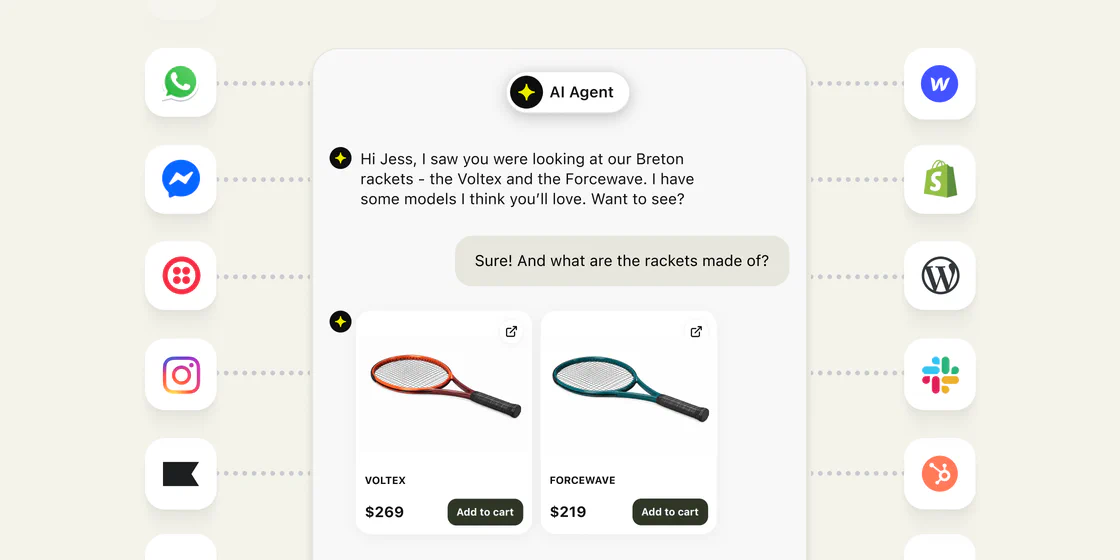 Three connection patterns, in rough order of how much engineering they need to connect with existing systems:
- Native integrations. The platform ships a prebuilt connector to your commerce or ticketing system. Shopify order lookup is the common example, and 76% of contact centers already leverage chatbot technologies for this kind of integration. No engineering, and the fastest route to real resolution rates.
- Webhooks and API actions. You define an endpoint the system can call mid-conversation, along with what it may send and what it gets back. More flexible, and needs someone who can build and maintain the endpoint.
- Agent-side context. The system does not act, but surfaces relevant account data to the human who picks up. Useful as a first step when you are not ready to let AI touch production systems.
Two design decisions to make explicitly here. First, decide read versus write. Reading order status is low risk. Issuing refunds, changing addresses, and cancelling subscriptions are write actions, and each one deserves its own decision about whether AI should perform it unsupervised. Start read-only and expand deliberately. Integrations are also where ai in customer service starts producing measurable cost savings, with support costs reduced by up to 30%.
Second, decide what happens when the lookup fails. An API timeout should produce a graceful handoff, not a hallucinated order status. Ask any vendor to show you this behavior during evaluation rather than taking it on trust.
5. Write the guardrails before launch, not after
Decide in advance what the system must never attempt if you want to protect service quality. Common boundaries: no commitments about refunds outside policy, no medical or legal interpretation, no promises about delivery dates it cannot verify, immediate handoff on any mention of a complaint escalating.
Set tone and role explicitly, including a consistent tone across customer-facing interactions. The NIST AI Risk Management Framework and its Generative AI Profile (NIST AI 600-1) are the reference worth borrowing from here. The useful idea for a support team is that governance is a design activity rather than a review that happens afterward: assign ownership, document what the system is allowed to do, define when sensitive cases must defer to the human touch of human reps, and set the human oversight path before anything goes live.
6. Disclose that it's AI
This became a legal requirement in the EU. Article 50 of the EU AI Act applies from 2 August 2026 and requires that systems interacting directly with people, including chatbots and AI agents, are designed so users are informed they are interacting with AI. The obligation reaches providers and deployers outside the EU where the system's output is used there.
Practically: make it clear at the point of interaction rather than in a policy nobody opens. Disclosure also tends to help rather than hurt, because customers who know they are talking to AI ask better questions and escalate sooner when they need a person.
7. Test before you launch
Nearly every guide tells you to pilot. Almost none tell you how to know whether the thing is ready. This is the step that separates a controlled rollout from an experiment on live customers.
- Build a golden set. Pull 50 to 100 real questions from your ticket history in the category you are launching. Include the awkward phrasings, the misspellings, the ones with two questions in a single message. Write down the correct answer for each. This is your benchmark, and it takes an afternoon.
- Score against it. Run the set and mark each response from the conversational ai bot as correct, incomplete, wrong, or correctly escalated. The last category matters as much as the first. A system that says "I don't have that, let me get someone" on a question outside its scope is behaving correctly, and scoring it as a failure will push you toward a system that guesses instead. Repeated testing matters because continuous learning can improve one area while introducing errors in another.
- Test the failure paths deliberately. Ask things it should refuse. Ask for a refund outside policy. Claim to be an existing customer without verification. Ask about a competitor's product. Ask the same question five different ways to check consistency. Include complex queries that combine policy, account status, and urgency. Send a message in a language you have not configured, or verify how it handles a customer's preferred language if you plan to support multiple languages. What you are looking for is graceful failure rather than a confident wrong answer. Where relevant, testing should also verify compliance with GDPR and HIPAA.
- Re-run the golden set after every content change. Updating the knowledge base can fix one thing and break another, and without a regression check you will not notice for weeks. This is the habit that keeps quality from drifting once the launch excitement fades.
In mature deployments, AI chatbots can resolve up to 50% of support queries instantly.
Set a threshold before you look at the results. Decide in advance what score justifies going live, so the number does not get negotiated downward on launch day.
8. Pilot, read transcripts, then expand
Launch to the narrow scope, using virtual agents as the first deployment layer. Then read the conversations. Not the dashboard, the actual transcripts.
Weekly transcript review is the highest-return habit in this whole process. It surfaces the questions your knowledge base cannot answer, the phrasings that confuse the system, the customer feedback behind CSAT shifts, and the moments where it should have escalated and did not. Fix those, then widen the scope one category at a time, checking whether intelligent triage correctly identifies user intent before transfer to human agents.
Handling customer data responsibly
Support conversations are full of personal data. Names, addresses, order histories, payment problems, and sometimes health or financial details volunteered without being asked for. Routing that through an AI system means the underlying AI technology creates privacy obligations in customer service operations that are easy to overlook when the focus is resolution rates.
The NIST Generative AI Profile treats data privacy as one of its named risk categories for exactly this reason. Five questions worth answering before launch:
- What leaves your systems? Understand what gets sent to the model provider and what stays local. Ask vendors directly, and get it in writing rather than inferring it from a marketing page.
- Is your data used for training? Business-tier agreements with reputable vendors normally exclude customer data from model training. Confirm rather than assume, because the default differs by vendor and by plan.
- How long is it retained? Conversation logs are useful for quality review and a liability if kept indefinitely. Set a retention period that matches your existing support data policy rather than inventing a new one.
- Can you redact? The stronger platforms detect and mask payment details and identifiers before they reach the model or the logs. If yours cannot, decide what your agents should do when a customer pastes a card number into chat, because eventually one will.
- Who are the sub-processors? Under GDPR, your AI vendor's own vendors are your concern too, and some deployments may also need to account for HIPAA. This belongs in your records of processing, and it is the question most teams discover late, usually during a security review that delays a launch.
Practical version: bring this to whoever owns privacy at your company during evaluation, not after you have signed, so privacy review happens before rollout and supports customer service operations without creating compliance risk.
What conversational AI handles well
- Repetitive factual queries. Order status, return windows, shipping timelines, account questions, opening hours. This is the bulk of most support volume, and routine inquiries are exactly what AI should handle before escalating more complex issues.
- Coverage outside business hours. Overnight and weekend questions get answered rather than queued. Among the clearest benefits of conversational ai is 24/7 customer support availability.
- Multilingual support. Detection and reply in the customer's preferred language without hiring per market.
- Volume spikes. Launches and holiday peaks stop translating into response-time collapse, because concurrency is not a constraint, which also frees up contact center agents for higher-value work.
- Pre-purchase questions. A shopper asking which model fits their setup is in a buying conversation. Connected to a live catalog, conversational AI can recommend and close rather than just inform. This is the use case most support teams underweight, and it is why ChatBot.com attributes orders back to the conversation that produced them.
Where it does not do well: negotiation, genuine complaints, judgment calls about exceptions to policy, and anything where being wrong is expensive. Design the escalation path for these before you design anything else. In practice, AI can resolve up to 50% of support queries instantly and, in stronger deployments, improve customer satisfaction scores by 38-44%.
Metrics that actually mean something
- Resolution rate, not deflection. Deflection counts conversations that ended without reaching a human, which treats abandonment and resolution identically. A customer who gave up in frustration counts as a win. Measure whether the customer got what they needed.
- Escalation quality. When the system hands off, does the agent receive the full context? Track how often agents have to ask the customer to repeat themselves after a handoff. That number should be near zero, and it usually is not. Good handoffs and fast resolution help protect customer satisfaction.
- Containment by category. An aggregate resolution rate hides the categories where the system is struggling. Break it down.
- CSAT on AI-handled conversations specifically. Compare against human-handled equivalents for the same ticket types. Review AI-handled CSAT alongside customer feedback, because 22% of support leaders expect customer satisfaction to improve with AI, 67% of North American support leaders plan to invest more in AI for customer satisfaction, and 81% believe AI improves employee experience. If AI-handled CSAT is materially lower, you have scoped it too broadly.
- Cost per resolution. Particularly important if your platform meters AI usage. Per-resolution and per-conversation billing means your costs scale with success, which is worth modeling before volume grows. These metrics also show whether conversational AI is improving the customer experience, not just throughput. Our pricing page includes AI resolutions in the plan rather than metering them separately, which makes this number predictable.
- Revenue attributed to conversations. If support is talking to buyers, measure what those conversations produce.
Who owns conversational AI customer service, and how to bring your team along
Two questions that decide whether this sticks, and neither is technical.
Someone has to own it
Conversational AI solutions are not a project that finishes; they are an ongoing operational capability. Content goes stale, customers ask new things, products change, and quality drifts unless someone is watching.
In practice the owner should sit in support operations rather than IT. The work is reading transcripts, and customer service teams should own that review and refinement work by spotting content gaps, adjusting tone and escalation rules, and running the golden set after changes. That is support knowledge, not engineering knowledge, and it is a reason to favor platforms your team can configure without filing tickets.
Realistically it is a few hours a week after launch, more in the first month. The failure pattern is when it belongs to everyone, which means nobody reads the transcripts and quality erodes quietly. conversational ai improves over time only when someone actively maintains it.
Your agents will assume this is about replacing them
Ignoring this does not make it go away, it just means the conversation happens without you. Stanford's AI Index found a wide gap between how experts and the public expect AI to affect work, and your support team sits on the public side of it. In practice, ai in customer service works best when it supports rather than replaces human agents.
Three things that help:
- Be straight about the intent. If the plan is to absorb volume growth without hiring, say that. If the plan is headcount reduction, your team will work it out faster than you expect, and discovering it later costs you the cooperation you need.
- Put agents on the design. They know which questions are repetitive and which look simple but hide traps. They also spot bad AI answers faster than anyone, because they know what the right one sounds like. Involving them early produces a better system, while complex issues should still stay with the people best equipped to handle them.
- Change what you measure. If agents were measured on tickets closed, and AI now closes the easy ones, their numbers drop while their work gets harder. Adjust the metrics before the rollout, or you will penalize your team for the automation you introduced, instead of helping contact center agents focus on higher-value conversations.
Where conversational AI customer service deployments go wrong
Four failure modes, in rough order of frequency.
- The knowledge base was never cleaned. Everything downstream inherits this. Poor source quality weakens conversational ai capabilities regardless of the model. Symptoms: confident wrong answers, contradictory responses to similar questions, citations of superseded policy.
- Scope expanded faster than accuracy. A system that handled order status well gets pointed at billing disputes, and quality drops across the board. Expand one category at a time, and check the metrics before the next one.
- Nobody reads the transcripts. The dashboard says 71% resolution and everyone is satisfied. Meanwhile the transcripts show customers rephrasing the same question four times before giving up, with key points in the exchange where frustration is already obvious. Dashboards report what you configured them to count.
- Escalation was an afterthought. The handoff exists but drops context, or the criteria are so narrow that frustrated customers cannot reach a person. Failures often show up first in complex queries that should have been escalated earlier. This produces the worst outcome available: a customer who needed help, could not get it, and now believes you deliberately made it hard.
None of these are technology problems, which is the point. The model is rarely the constraint.
Start with one category
Conversational AI for customer service can reduce response times and improve consistency, but it is not hard to switch on. It is moderately hard to run well, and the difference is almost entirely preparation: clean content, explicit guardrails, a real escalation path, and someone reading transcripts every week.
ChatBot.com trains AI Agent on your own content, keeps answers tied to sources you approve, deploys across web, WhatsApp, Messenger, and SMS, supports multiple languages, and connects to live chat and ticketing in one workspace. A few examples include answering FAQs on your site and routing support requests from messaging channels. No code required.
Start your free 14-day trial and see what happens when your service starts selling.
FAQ
What is conversational AI for customer service? It's the technology that lets software understand customer questions in natural language, find answers in your business content, and respond or take action. It combines language understanding, dialogue management, retrieval from your sources, natural language generation, and integration with the systems that hold the answers.
How is conversational AI different from a chatbot? "Chatbot" covers both. A rule-based chatbot follows paths someone built by hand and breaks on unexpected phrasing. Conversational AI interprets intent and constructs answers from your content, so it handles phrasings nobody anticipated. In practice, most tools marketed today as chatbots are conversational AI underneath, sometimes labeled a conversational AI bot.
How long does implementation take? Going live takes days on a modern platform. Reaching good accuracy takes longer, and most of that time goes into knowledge base preparation rather than configuration. Budget more for content cleanup than for setup.
Do I have to tell customers they're talking to AI? In the EU, yes. Article 50 of the EU AI Act has applied since 2 August 2026 and requires people be informed they are interacting with an AI system. It reaches non-EU businesses whose output is used in the EU. Outside the EU it's not universally mandated, though disclosure is good practice and increasingly expected.
Does conversational AI work for phone support? Yes, and it's a harder build than chat. Voice adds a latency budget, no visual fallback, speech recognition, and speech-to-text errors that cluster on order numbers and email addresses. Most teams get better results proving the knowledge base and escalation logic in chat first, then extending to voice, since the content carries over even though the error handling does not.
How do I know it's ready to launch? Build a golden set of 50 to 100 real questions from your ticket history with known correct answers, score the system against it, and set your pass threshold before you see the results. Test the failure paths too, meaning out-of-scope questions, requests it should refuse, and inconsistent phrasings.
What resolution rate should I expect? Treat vendor headline figures as ceilings from mature deployments. Forecast conservatively and treat anything higher as upside. Many teams are already operating in this category: 76% of contact centers leverage chatbot technologies for customer service. Your knowledge base quality is the largest variable, ahead of which platform you chose.
Can conversational AI replace support agents? No. It handles the repetitive majority so people can spend time on the conversations that need judgment. Adoption is also driven by economics: conversational AI can reduce customer service labor costs by $80 billion by 2026, and 67% of North American support leaders plan to invest more in AI. The deployments that work treat it as capacity rather than replacement, and they invest in the handoff.


